|
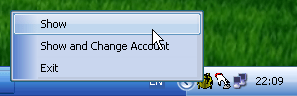
System Tray Icon |
To activate SCARABAY, click left button on the System Tray Icon
To open the SCARABAY menu click right button
Select – Show to activate SCARABAY
Select Show and Change User to open password dialog window.
Select Exit to close SCARABAY.